1. What is Server Hardware?
Server hardware refers to the physical components that make up a server and provide a foundation for all the critical tasks a server performs. Unlike a typical desktop PC, it boasts superior processing power, larger memory capacity, and robust storage solutions to handle the demands of multiple users and applications running simultaneously. This enhanced power and reliability ensure the smooth operation of everything from complex databases to company-wide email systems.
In simpler terms, server hardware is what allows servers to:
- Store and manage data: Server hardware provides secure storage for vast amounts of information, such as business emails and social media posts
- Run applications: Whether it’s an e-commerce platform or a complex database, server hardware provides the processing power to keep these applications running smoothly.
- Deliver resources: Printers, scanners, and other network devices rely on server hardware to connect and share resources with other users.
But why wouldn’t a business simply use a public cloud server platform, like the ones provided by Google or Microsoft? Though convenience is certainly a factor for many businesses, some organizations choose to invest in their own in-house servers or private cloud solutions for specific reasons. For instance, they might need to handle highly sensitive data that requires the utmost security. Additionally, certain applications are too complex to migrate to a public cloud, making the process costly. In these cases, owning and operating their own server hardware allows for greater customization and control over their digital infrastructure.
Thus, in this article, we’ll discuss the different installation types of server hardware available, the application of their components, and the crucial factors to consider when choosing server hardware for your specific needs.
2. Installation Types of Server Hardware
Server hardwares can be installed with various methods and each form provides different capabilities. The common installation types include tower servers, rack servers, blade servers, hyperconverged infrastructures, and mainframes.
2.1 Tower Servers

Tower servers are housed in a stand-alone, vertical cabinet and they’re generally the most cost-effective option, making them ideal for smaller businesses with basic workloads, such as printing and simple file management. Their lower component density also translates to easier cooling, reducing the need for complex, high-cost cooling systems.
However, tower servers have a larger size compared to other options. This can be problematic for businesses with limited space. Also, their expandability is limited. While you can add components for basic upgrades, scaling a tower server to handle significantly increased workloads can be challenging.
2.2 Rack Servers

Rack servers are designed to be stacked together on server racks, offering a compact and space-saving solution. They have increased processing power and storage capacity, allowing them to handle a wider range of workloads compared to tower servers. They’re also highly scalable, as you can easily add more servers to the rack according to your needs. This flexibility makes them ideal for medium to large businesses with growing IT demands, especially those running applications that require moderate processing power, such as databases or virtual machines.
On the other hand, it is important to note that managing cable clutter within rack servers can be difficult, but this cannot be overlooked as proper cable management is essential for airflow and overheating prevention. Plus, rack servers require more robust cooling systems compared to tower servers due to their proximity to the rack.
2.3 Blade Servers

To create blade servers, multiple thin blades, each housing its own processor, memory, and network controllers, are slid into a single chassis to offer the ultimate space efficiency and scalability. Furthermore, these individual blades can be easily hot-swapped for maintenance or upgrades, minimizing downtime. This is why blade servers are ideal for large businesses with critical computing needs, particularly those involved in high-performance computing (HPC) or cloud service providers.
Nevertheless, this power and efficiency come at a premium. Blade servers are the most expensive option among server hardware types. They also require specialized chassis and management software to function, adding to the overall cost. Moreover, blade server systems are usually vendor-specific, which can limit upgrade options.
2.4 Hyperconverged Infrastructures

Unlike traditional servers where computing power, storage, and networking resources are separate entities, hyperconverged infrastructure (HCI) combines them all into a single, pre-configured system, which often comes as an appliance (a pre-assembled server) or a software-defined solution. This design offers a straightforward setup and easy management, making it a great choice for small to medium businesses with virtualized workloads or remote offices.
Even though it is convenient to use, upgrading individual components within a HCI system can be limited, as it is designed to function as a whole unit, so individual components may not be easily swapped or upgraded. Besides, the overall processing power of an HCI system is usually lower than that of high-end traditional servers.
2.5 Mainframes

Mainframes have been around since the 1950s, making them the original servers in the IT world. The modern version offers unmatched processing power and rock-solid security for mission-critical tasks. Hence, these high-powered, ultra-reliable systems are suitable for large financial institutions, government agencies, or any other organizations handling massive datasets and crucial transactions.
Despite these capabilities, mainframes are highly expensive and can be complex to manage, as they require specialized IT staff for operation. This is why mainframes are considered a niche solution for the organizations mentioned above and not commonly used for commercial businesses.
3. The 10 Main Components of a Server Hardware
Though the installation method for each server may differ, there are up to 10 server hardware components that are considered essential, including:
- Rack
- Chassis
- Motherboard
- Processor or Central Processing Unit (CPU)
- Storage
- Random Access Memory (RAM)
- Network Interface Card (NIC)
- Power Supply Unit (PSU)
- Graphics Processing Unit (GPU)
- Cooling System
3.1. Rack
A rack is a multi-level shelf specifically designed to house servers and other networking equipment. You can store multiple servers, cooling systems, switches, routers, and other networking devices in a single location, improving airflow, accessibility for maintenance, and overall data center space utilization.
As your IT needs grow, you can easily add additional servers by simply installing them in empty slots within the rack. This modular approach allows for flexible expansion of your server infrastructure. Plus, many racks come with lockable doors and panels to safeguard your critical IT equipment from unauthorized access or physical damage. The use of draw latch slide locks for these panels can secure them efficiently while saving space.

To simplify maintenance, some users even incorporate spring locks between racks to clamp them securely and create a mechanism for operators to easily pull hardwares in or out of the racks. Spring locks can also help extract and position server racks segment-by-segment. Additionally, press-in rollers can be used with server lifts to reduce friction and improve operation fluency during maintenance.

3.2. Chassis
The chassis, often referred to as the server case, is the metal housing that encases individual servers, acting as a protective shell for the delicate internal components, to shield them from dust, debris, and accidental impact. By using secure fasteners such as Fivetech’s spring locks, the risk of the chassis loosening due to vibration can be reduced, while the fasteners’ spool design and lateral fastening creates more convenience for its limited space.

Furthermore, the chassis also provides a sturdy framework that holds all the server components securely in place, ensuring proper alignment and connection for smooth performance. This can be optimized with the use of rotate hinges that can provide a multi‑stage positioning function to make sure the chassis cover is connected securely and held at a preferred angle to simplify maintenance.

For efficient maintenance, axe-shaped rotate ejector handles can be used on the chassis to eject and hook it back together easily. Some of these ejector even feature an optional locking function so that you won’t accidentally shift the chassis. It also prevents the chassis from sliding out during operation.

3.3. Motherboard
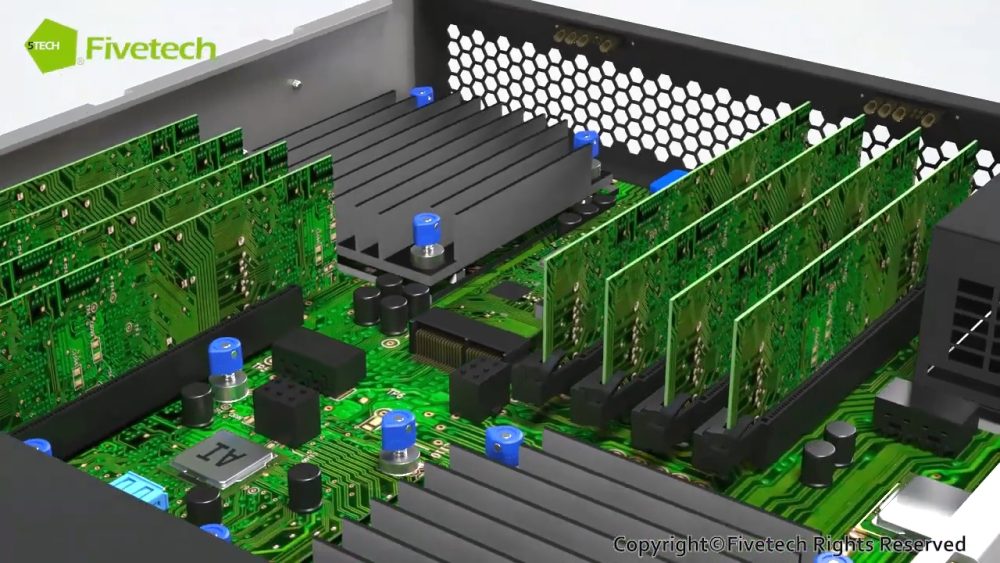
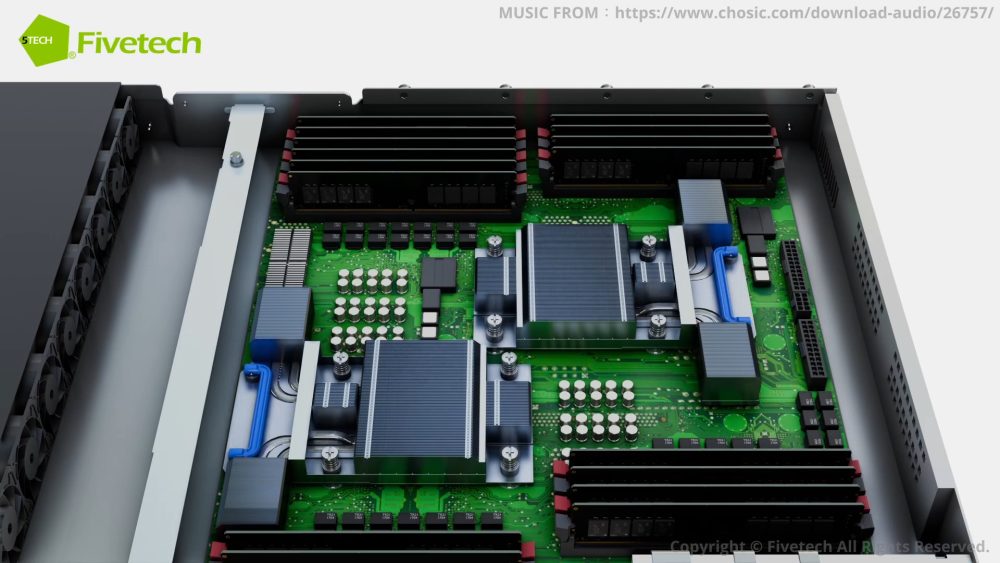
The motherboard is a large circuit board that acts as a communication hub, connecting all the other components like the CPU, RAM, storage drives, and network adapters. It also houses the BIOS chip, which provides basic instructions for the server to boot up.

The delicate parts on the motherboard can be mounted with SMT pins, studs and high torque SMT nuts that offer precise positioning and anti-rotating features for optimal connection and reliability. SMT spring locks are also tool-less solutions that can clamp the motherboards and components together securely to boost maintenance efficiency, while featuring a spring design that can prevent them from loosening even when there are vibrations.

3.4. Processor or Central Processing Unit (CPU)
The CPU, or central processing unit, is the server’s workhorse. It’s responsible for processing instructions, fetching data from memory, and executing tasks. The number of cores that a CPU has determines how many tasks it can handle simultaneously, as more cores generally translate to better performance for demanding workloads.

Image Source: FreePik
3.5. Storage
Your server’s storage is where data is saved permanently. The two main types include HDD (Hard Disk Drive) and SSD (Solid State Drive). HHD is a traditional storage option that uses spinning disks to store data. It offers large capacities at a lower cost but is slower than their solid-state counterparts.

Source: Freepik
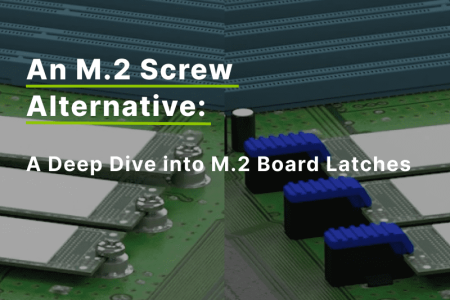
On the other hand, SSDs use flash memory chips for faster data access and retrieval, ideal for applications requiring high performance. However, SSDs are much more delicate, which is why the use of specialized M.2 latches is ideal when securing them into a server, as the snap-in or snap-in-turn operation makes assembly/disassembly quick and easy. To maximize the capacity of the server, users can also use double M.2 board latches to simultaneously install two M.2 cards of varying lengths, creating a versatile and space-efficient design.

3.6. Random Access Memory (RAM)
RAM stores data that the CPU needs to access quickly for ongoing operations. Unlike storage drives, RAM is volatile, meaning data is erased when the server is powered off. Having sufficient RAM ensures the server can run multiple programs smoothly without lags.
3.7. Network Interface Card (NIC)
The NIC (network interface card) acts as the server’s network adapter. It allows the server to connect to a network and communicate with other devices. Some motherboards have integrated NICs, while others require separate add-on cards.
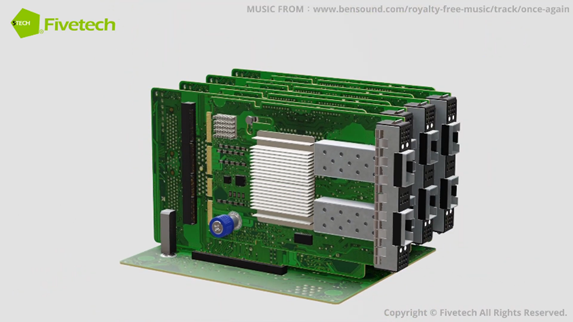
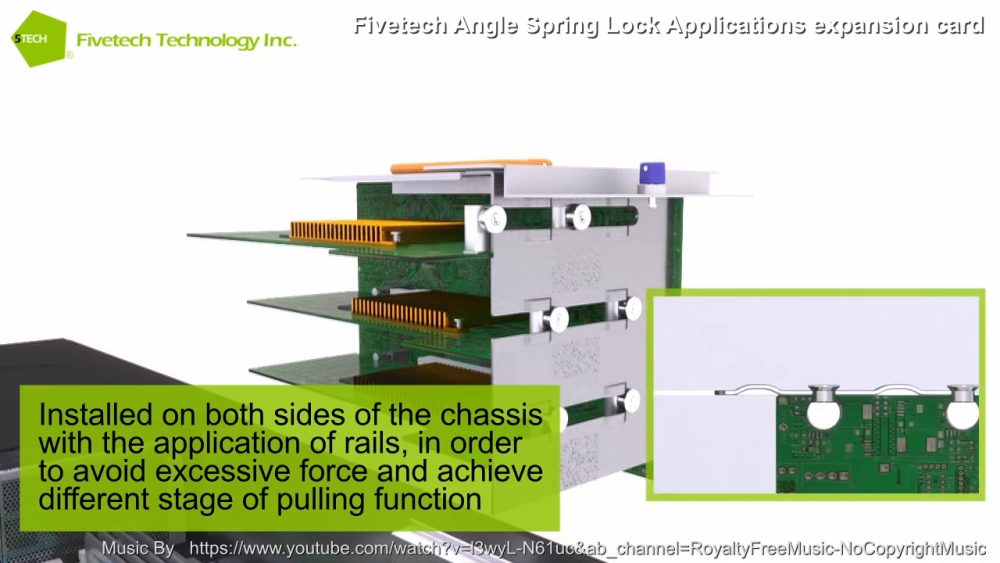
To install NIC cards into the server, you may use a SMT series angle guide pin, nut, or captive screw, to ensure precise positioning and efficiency. You can also consider using automatic clamping devices such as SMT angle spring locks to avoid excessive force to the delicate components. This type of spring lock also features an angled design that allows quick-release in various directions, making it easier to use in limited spaces.
3.8. Power Supply Unit (PSU)
The PSU is responsible for converting incoming AC (alternating current) power from the wall outlet to DC (direct current) power that the server components can use. Servers require a reliable power supply to function properly, and some critical applications might even require multiple back-up PSU configurations to reduce downtime during system failures.
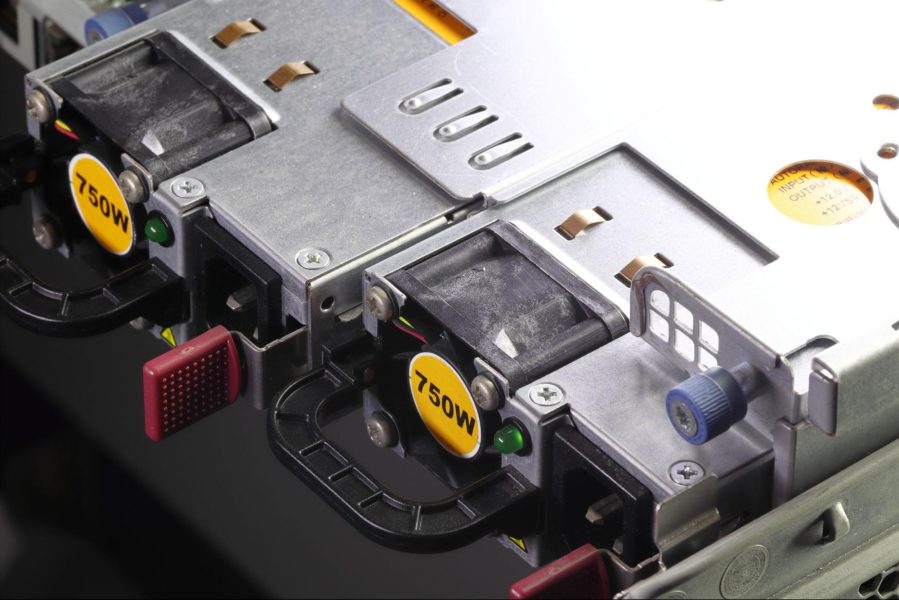
For easier operation and maintenance, smart folding handles, latch locks, or slide locks can be used on PSUs to assemble or disassemble it efficiently. The 90-degree handle design also prevents vibration and noise, and it can be folded when stored, saving space within the server hardware. Certain brands, like Fivetech, even incorporate heat-resistant and flame-retardant plastic for insulation to prevent scalding and electrical shocks, ensuring safety during operation.
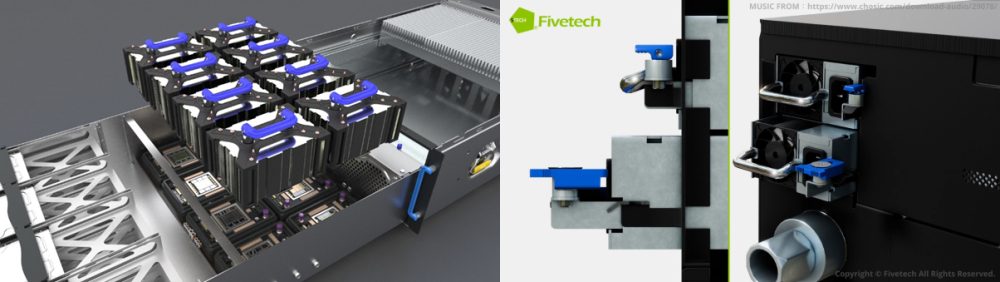
3.9. Graphics Processing Unit (GPU)
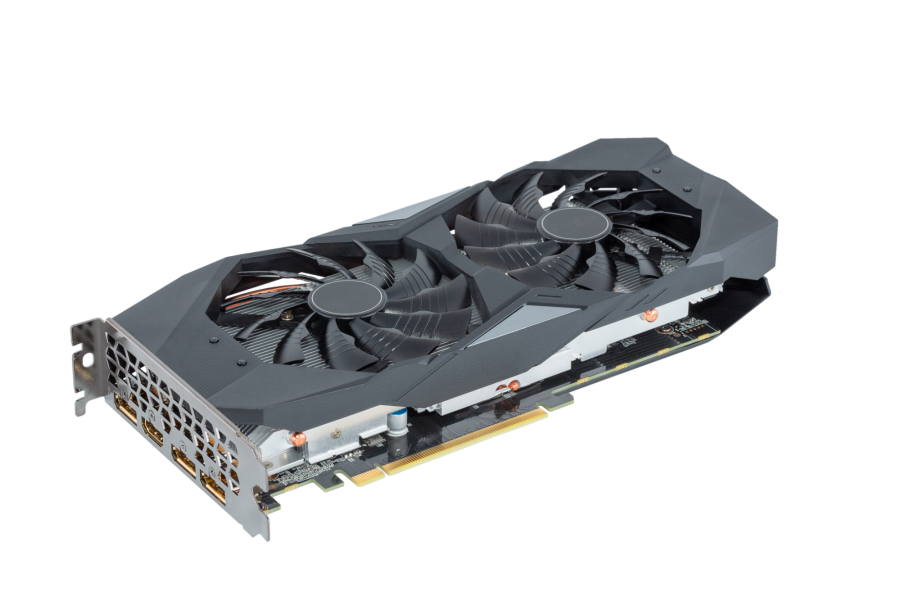
While not essential for all servers, GPUs (graphics processing units) are becoming increasingly common for specific tasks. GPUs excel at handling massive amounts of data, complex calculations and image processing, making them ideal for applications like scientific computing and video editing.
Moreover, GPU is also crucial for machine learning, as the process of training AI models to recognize and understand patterns in data, requires immense computational power. By leveraging the parallel processing capabilities of GPUs, AI models can learn from vast data in a short amount of time, enabling them to perform tasks like image recognition, natural language processing, and decision-making.
3.10. Cooling System
As servers operate over time, they generate heat. The cooling system, consisting of fans and heat sinks, plays a vital role in dissipating this heat and maintaining optimal operating temperatures for all the internal components, which is also crucial in preventing damage and prolonging their lifespan.
With the prevalence of AI servers, cooling systems have evolved to be increasingly sophisticated, but the installation process of heavy cooling plates can sometimes be difficult, which is why there is a growing demand for effortless and efficient installation tools, such as module-thread in smart folding handles and rotate ejectors. Module-thread in smart folding handles enables a secure hold onto the components, reducing the risk of drops and damage to the delicate parts.
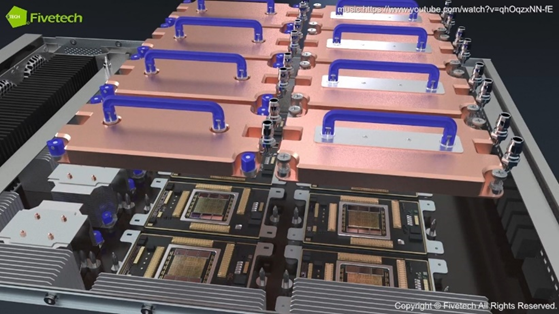
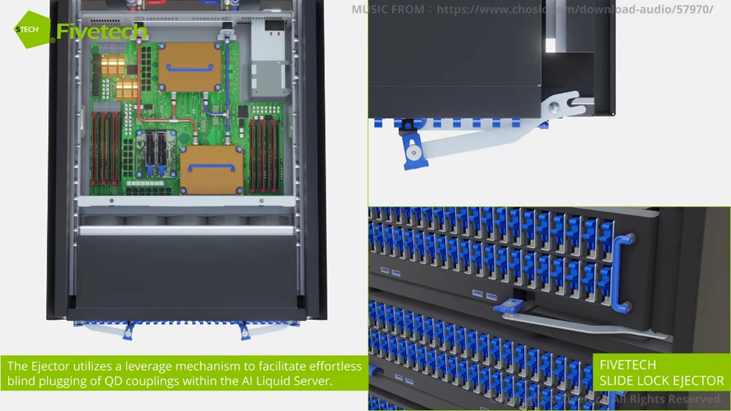
On the other hand, rotate ejectors feature a push-back/positioning function that allows quick and easy disconnection/blind mating of liquid cooling system connectors (Quick Disconnects, QDs), as well as precise alignment. This eliminates the risk of impact to the water cooling connectors, preventing damage and ensuring optimal system performance.
4. Tips for Server Hardware Management and Maintenance
Just like any high-performance machine, the hardware components of a server require proper care to function optimally and ensure long-lasting service, so be sure to practice regular server hardware maintenance by removing dust building and also by monitoring CPU usage, memory consumption, storage capacity, and system temperatures. This can help create a smooth-running and secure digital environment for your business. Other than that, here are some key tips you should keep in mind:
- Software Updates: Keep your server operating system (OS) and firmware updated with the latest security patches and bug fixes. This will not only enhance security but also improve the server’s performance and stability.
- Power Supply Management: Make sure the power supply for your server hardware is clean and stable. You can also consider using a UPS (Uninterruptible Power Supply) to minimize the issues caused by power outages and voltage fluctuations.
- Backups and Disaster Recovery: Regularly back up your critical data to a secure offsite location. This ensures that you can recover vital information in case of hardware failure or other problems.
- Environmental Control: Maintain a cool and dry environment for your server room, as excessive heat can significantly shorten the lifespan of server hardware.
- User Access Control: Implement strict user access controls to prevent unauthorized modifications or installations on the server, safeguarding your system from malware and other security threats.
- Documentation: Maintain detailed documentation of your server hardware configuration, including installed software, hardware specifications, and user accounts. This information proves invaluable for troubleshooting and future maintenance tasks.
5. How Can the Right Components Help Streamline Server Hardware Management?
Choosing the right hardware components for your server goes beyond processing power and storage capacity, it will significantly impact the ongoing management, maintenance, and efficiency of your server environment. With the right choice of server components, your system can benefit greatly with:
- Reduced System Downtime and Operating Costs: When a server hardware fails, the faster you can replace the damaged components, the less computing power and profit you lose. By using components with quick-release mechanisms, such as quarter-turn locks, you can facilitate easier access to critical components, minimizing downtime associated with repairs and upgrades, as well as a reduction in labor costs.
- Optimized Server Layout: Data centers often face space constraints but choosing server components designed for efficient space utilization allows you to pack more processing power into a confined area. For instance, Fivetech’s buckle lock double m.2 board latch allows you to simultaneously stack memory modules and heat sinks, maximizing the limited space within your server chassis.
- Operation Convenience: Using tools on complex server hardware can be difficult during maintenance or upgrades. There is even the risk of damaging or misplacing these components. So, user-friendly components with tool-less features like captive screws can make a world of difference, as it streamlines disassembly and replacement procedures, saving you time while preventing damage to your hardware.
- Improved System Flexibility: A modular server design with interchangeable components allows you to leverage existing modular products when planning new servers, eliminating the need for a complete redesign or retooling. This flexibility ensures that your server hardware can scale alongside your growing business needs and also minimizes manufacturing costs.
6. Purchasing Considerations for Server Hardware
With these benefits in mind, the 4 main factors you need to consider when buying server hardware include:
- Matching Needs with Performance: Carefully evaluate your specific needs and workloads. Overspending on features you won’t utilize is a waste of resources. So, be sure to identify the processing power, memory capacity, and storage requirements to find the optimal balance between performance and costs.
- Prioritizing User-Friendly Features: Unless you are running a large-scale operation, the people managing your server hardware may not be engineers. It is recommended to look for features like tool-less operation, quick-release components, and intuitive layouts, so that you can significantly improve maintainability and reduce the risk of errors during hardware interventions.
- Scalability: Think about your growth trajectory. Will your IT needs remain static, or do you anticipate an increase in workload over time? Consider choosing server hardware that allows for easy scaling and look for modular designs with additional storage slots, memory expansion options, and the ability to accommodate upgrades to processors or other components.
- Brand and Warranty: Make sure to choose established server hardware brands known for reliability and quality, such as the high-quality fastener solution brand Fivetech, as this will impact your system operation greatly. Moreover, a solid warranty ensures replacement or repair coverage in case of hardware failure, minimizing downtime and unexpected expenses.
7. Future Trends of Server Hardware
Driven by the increasing demands of AI, high-performance computing (HPC), and data-intensive applications, the emergence of new technology continues to reshape the server hardware landscape.
One of the notable trends is the rise of AI-centric hardware. To meet the computational needs of AI workloads, server hardware is evolving to include specialized processors and accelerators, capable of handling complex calculations and image processing with greater efficiency than traditional CPUs. At the same time, the reliance on GPUs will increase as well, since their parallel processing capabilities are essential for training AI models and handling intensive computing tasks.
Another critical development lies in data transmission. The growth of AI and HPC has intensified demands for faster data transfer speeds, leading to reduced network performance, overheating, and even power consumption issues. Silicon photonics, with its high bandwidth and low-loss characteristics, emerges as a promising solution. By leveraging silicon for optical components, this technology enables faster data transmission, reduced power consumption, and lower latency. With this, data center operators can significantly benefit from enhanced data transfer efficiency, lower operational costs, and optimized space efficiency.
Moreover, this ever-growing processing power of server components will translate to a greater heat load. To combat this, the mechanical components of the servers are beginning to integrate smarter and more compact cooling systems, such as advanced liquid cooling or dynamic fans, which can help maintain optimal performance while minimizing energy consumption and noise pollution.
On top of that, with environmental sustainability becoming a top priority, green computing practices are gaining focus in the server hardware industry. So, expect to see manufacturers focusing on energy-efficient components and innovative power management solutions, such as low-power processors and memory modules, as well as intelligent power distribution systems that optimize energy consumption based on server utilization.
Fivetech: Your Trusted Server Hardware Solutions
At Fivetech, we understand the importance of staying ahead of the curve. That’s why we’re constantly innovating and developing server hardware solutions that cater to the latest trends. We offer a comprehensive range of server components, from easy-to-use E1.S latch module for high density servers, Double M.2 board latch for space-efficiency, to panel latches specially designed for AI servers.
Furthermore, we are committed to providing compact, tool-less components that align with the miniaturization of server hardware, maximizing space within your data center. By partnering with Fivetech, you gain access to high-quality, future-proof server hardware solutions that deliver exceptional performance. Browse Fivetech for more server hardware components now!
Explore Fivetech Server Hardware Solutions
You May Also be Interested in
➤ Fivetech’s Captive Screws and Fasteners
➤ Ultimate Guide to Captive Screws: Types & Applications
➤ Quarter Turn Fastener – Fivetech
➤ Fivetech Quick Release Fastener | All Solutions
➤ Discover M.2 Board Latches: The Perfect M.2 Screw Alternative
➤ Mastering PCB Standoffs: A Comprehensive Guide to SMT Solutions
➤ A Guide to Folding Handles: Embracing Compactness and Functionality
➤ How to Measure Screws, Bolts, and Threads Sizes – Fivetech
➤ Fivetech’s Thumb Screws: Convenient and Reliable
➤ Exploring Riveting Machines: Advantages, Types, and Selection Tips – Fivetech